引言:我的探索之旅
当我第一次了解 Claude Code 的 Agent Skills 时,通过查阅官方文档,我发现 Skills 本质是一个文件夹。这个看似简单的描述立刻引发了我的两个核心疑问:
- 1. Skills 的完整路径,LLM 是如何知道的? 当触发 Skills 或需要获取 scripts、resources 时,它如何根据相对路径找到对应的文件?
- 2. 不同的 Claude Code 运行环境如何执行 Skills? 本地 CLI、Desktop 应用和 Web 版本,它们在执行 Skills 和工具时有什么区别?
这些问题促使我深入研究了官方文档、社区讨论,甚至逆向工程的分析文章。本文将分享我的发现和理解。
相关资源
- • Claude Code 官方文档
- • Agent Skills 概述
- • Anthropic 工程博客:Equipping agents for the real world with Agent Skills
Agent Skills 是什么?
官方定义
根据 Anthropic 官方工程博客 的定义:随着模型能力的提升,我们现在可以构建与完整计算环境交互的通用 Agent。但随着这些 Agent 变得更强大,我们需要更可组合、可扩展、可移植的方式来为它们配备领域专业知识。这促使 Anthropic 创建了 Agent Skills :有组织的指令、脚本和资源文件夹,Agent 可以动态发现和加载它们,以更好地执行特定任务。
官方文档进一步解释:Skills 是可重用的、基于文件系统的资源,为 Claude 提供领域专业知识——工作流、上下文和最佳实践,将通用 Agent 转变为专家。
Anthropic 用了一个很形象的比喻:为 Agent 构建 Skill 就像为新员工准备入职指南。现在任何人都可以通过捕获和分享程序性知识,用可组合的能力来专业化他们的 Agent,而不是为每个用例构建碎片化的定制 Agent。
Skills 的核心特点
- • 自包含性 :每个 Skill 是一个独立的文件夹,包含所有必要的脚本和资源
- • 可组合性 :Skills 可以相互调用和组合,形成更复杂的工作流
- • 上下文感知 :Skills 能够访问项目上下文和环境信息
- • 声明式定义 :通过
SKILL.md文件(包含 YAML frontmatter)声明 Skill 的元数据和能力
相关文档
- • Agent Skills 概述
- • Agent Skills 最佳实践
- • Anthropic 工程博客:Equipping agents for the real world with Agent Skills
Agent Skills 的架构设计
Skills 的文件结构
根据官方文档,一个标准的 Skill 包含以下结构:
pdf-skill/
├── SKILL.md            # Skill 元数据和核心指令(必需)
├── forms.md            # 表单填写指南(可选)
├── reference.md        # 详细 API 参考(可选)
└── scripts/            # 实用脚本
    └── extract_fields.py
SKILL.md 的结构
根据官方工程博客:
At its simplest, a skill is a directory that contains a
SKILL.mdfile. This file must start with YAML frontmatter that contains some required metadata:nameanddescription.
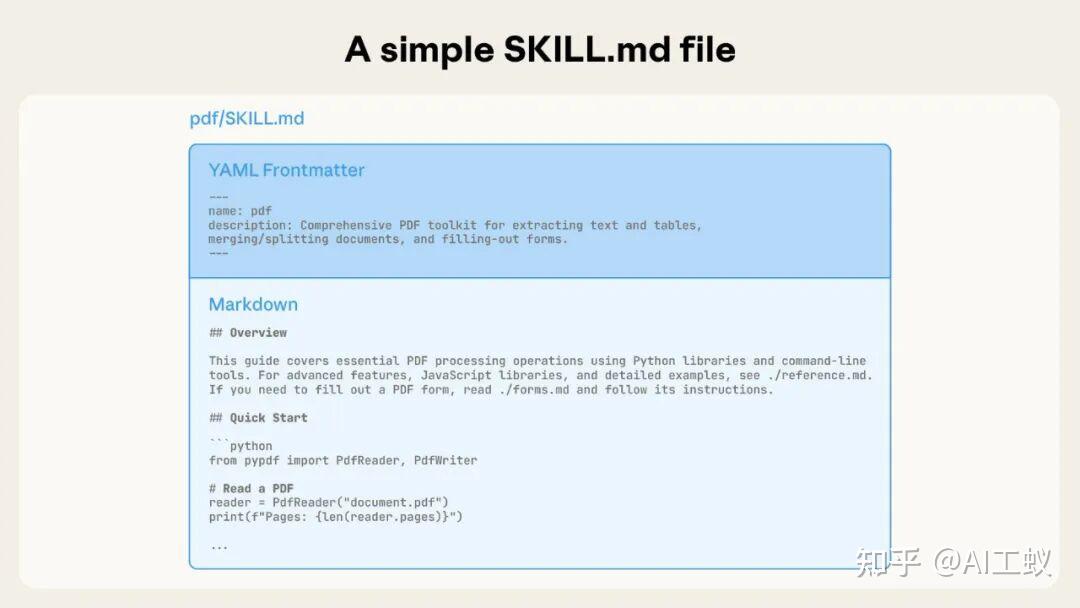
Anatomy of a SKILL.md file
示例:
```text
name: pdf-processing description: Extract text and tables from PDF files, fill forms, merge documents. Use when working with PDF files or when the user mentions PDFs, forms, or document extraction.
PDF Processing
Quick start
Use pdfplumber to extract text from PDFs…
For advanced form filling, see forms.md.
###  **Skills 架构的关键组件**

根据官方文档,Skills 包含三种类型的内容:

1. 1\.  **Instructions(指令)** :`SKILL.md` 及其他 Markdown 文件,包含工作流、最佳实践和指导
2. 2\.  **Code(代码)** :可执行脚本,Claude 通过 bash 运行,脚本代码本身不进入上下文窗口
3. 3\.  **Resources(资源)** :数据库 schema、API 文档、模板或示例等参考材料

###  **Skills 与代码执行**

官方工程博客特别强调了 Skills 与代码执行的关系:

Large language models excel at many tasks, but certain operations are better suited for traditional code execution. For example, sorting a list via token generation is far more expensive than simply running a sorting algorithm. Beyond efficiency concerns, many applications require the deterministic reliability that only code can provide.

In our example, the PDF skill includes a pre-written Python script that reads a PDF and extracts all form fields. Claude can run this script without loading either the script or the PDF into context. And because code is deterministic, this workflow is consistent and repeatable.
![[../../Attachments/18dd4aad4bdd7327077d743571533373_MD5.jpg||500]]
Skills can also include code for Claude to execute as tools at its discretion based on the nature of the task.
###  **架构争议与澄清**

在社区中,关于 Skills 架构的实现存在一些重要的讨论:

###  **Issue #11536 :澄清 "Agent VM" 与文件系统实现的差异**

**核心问题** :官方工程博客文章将 Skills 描述为 "Agent VM" 的一部分,暗示存在 VM 级别的隔离。但实际实现中:

- • Custom Skills 是 **基于文件系统的** (`SKILL.md` 文件在目录中)
- • 通过 **磁盘 I/O 读取** ,而非 VM 隔离
- •  **动态加载** 到上下文中
- • 每次读取都会 **消耗 token 预算**

###  **Issue #10067 :为什么不存在预编译的 Skills**

| 类型 | 内置 Skills (PDF 等) | 自定义 Skills |
| 加载方式 | 编译进 Claude Code 系统 | 从磁盘读取文件 |
| 可用性 | 系统启动时即可用 | 调用时动态加载 |
| Token 消耗 | 无额外消耗 | 每次读取消耗 token |

###  **相关文档**

- • Agent Skills 架构
- • 官方 Skills 仓库
- • GitHub Issue #11536 : 澄清 Skills 架构
- • GitHub Issue #10067 : 预编译 Skills 讨论

* * *

###  **Agent Skills 如何被加载?**

当 Claude Code 启动时,它如何发现和加载 Skills?

###  **Skills 的存放路径**

根据官方文档,Claude Code 会扫描以下 **三个具体路径** 来发现 Skills:

###  **1\. Personal Skills(个人 Skills)**

```text
~/.claude/skills/
存放位置:~/.claude/skills/my-skill-name/SKILL.md
适用场景:
- • 个人工作流和偏好
- • 正在开发的实验性 Skills
- • 个人生产力工具
2. Project Skills(项目 Skills)
.claude/skills/存放位置:项目根目录下的 .claude/skills/my-skill-name/SKILL.md
适用场景:
- • 团队工作流和规范
- • 项目特定的专业知识
- • 共享的工具和脚本
3. Plugin Skills(插件 Skills)
通过 Claude Code plugins 提供的 Skills。
渐进式披露(Progressive Disclosure)
官方工程博客详细解释了 Skills 加载的核心设计原则—— 渐进式披露 :
At startup, the agent pre-loads the
nameanddescriptionof every installed skill into its system prompt.
This metadata is the first level of progressive disclosure: it provides just enough information for Claude to know when each skill should be used without loading all of it into context.
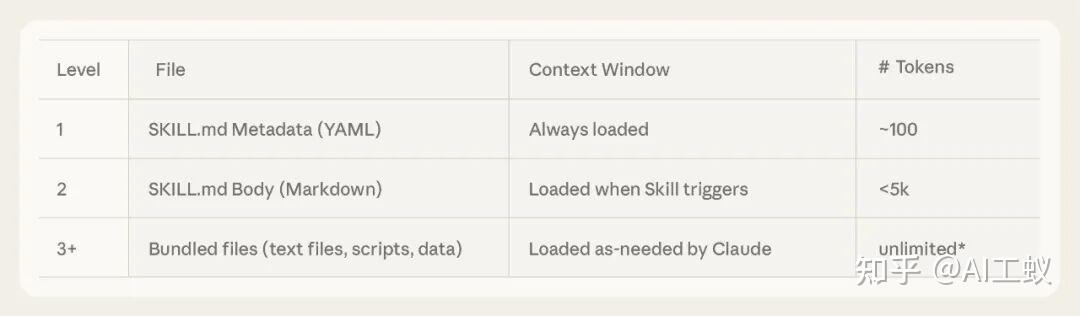
Progressive Disclosure
三级渐进式加载机制
Level 1:元数据(始终加载)
启动时,Claude 仅加载每个 Skill 的 YAML frontmatter(name 和 description),并将其包含在系统提示词中。
Level 2:指令(触发时加载)
If Claude thinks the skill is relevant to the current task, it will load the skill by reading its full
SKILL.mdinto context.
Level 3:资源和代码(按需加载)
As skills grow in complexity, they may contain too much context to fit into a single
SKILL.md, or context that’s relevant only in specific scenarios. In these cases, skills can bundle additional files within the skill directory and reference them by name fromSKILL.md.
随着技能复杂性的增加,它们可能包含过多上下文信息,无法全部放入单个SKILL.md中,或者某些上下文信息仅在特定场景下才相关。在这种情况下,技能可以在技能目录中捆绑其他文件,并在SKILL.md文件中按名称引用这些文件。
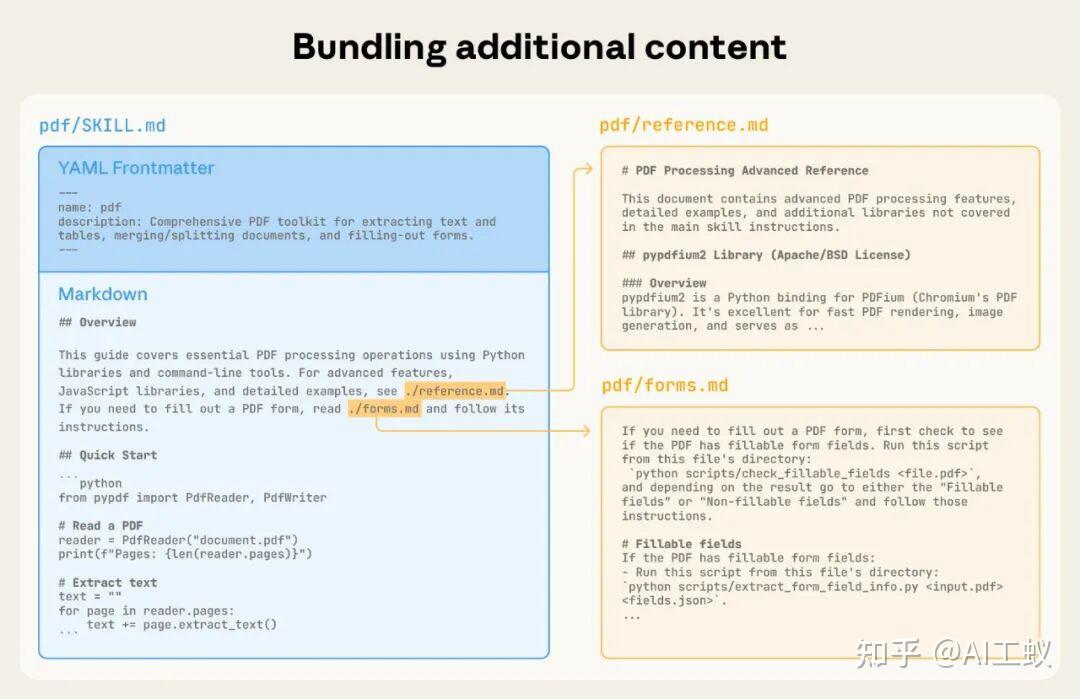
How to bundle additional content
官方总结了这种设计的优势:
Progressive disclosure is the core design principle that makes Agent Skills flexible and scalable. Like a well-organized manual that starts with a table of contents, then specific chapters, and finally a detailed appendix, skills let Claude load information only as needed.
渐进式披露是使代理技能灵活且可扩展的核心设计原则。就像一本条理清晰的手册,从目录开始,然后是具体章节,最后是详细的附录一样,技能允许 Claude 仅在需要时加载信息。
Skills 与上下文窗口
官方工程博客提供了一个清晰的图示,展示了当 Skill 被触发时上下文窗口的变化:
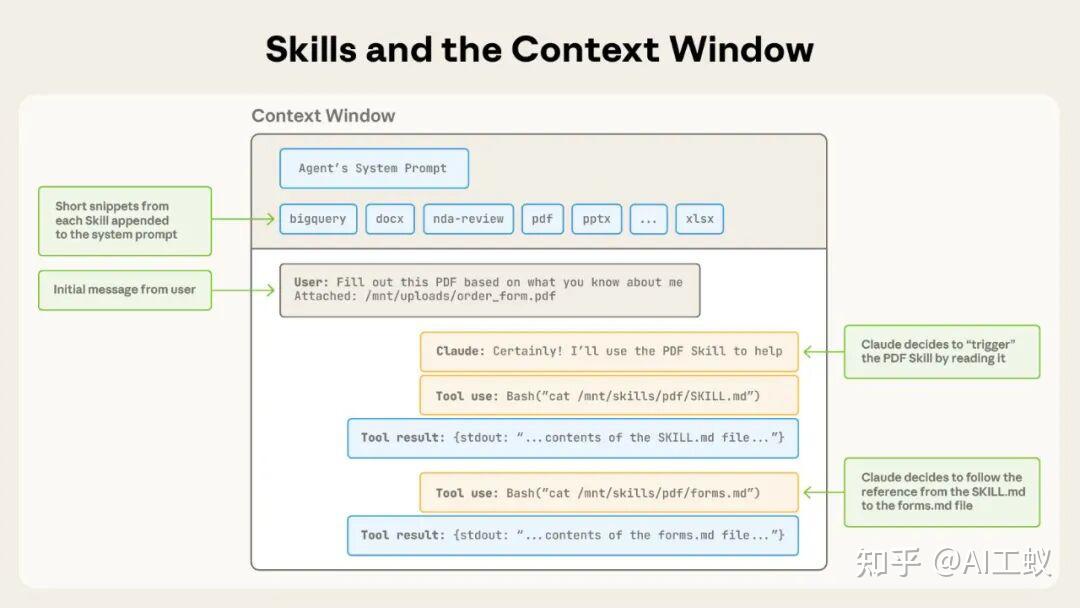
Skills triggered in context window
操作序列:
- 1. 开始时,上下文窗口包含核心系统提示词和每个已安装 Skill 的元数据,以及用户的初始消息
- 2. Claude 通过调用 Bash 工具读取
pdf/SKILL.md的内容来触发 PDF skill - 3. Claude 选择读取与 skill 捆绑的
forms.md文件 - 4. 最后,Claude 在加载了 PDF skill 的相关指令后继续执行用户的任务
相关文档
- • Claude Code Skills 文档
- • Agent Skills 架构
- • Anthropic 工程博客:Equipping agents for the real world with Agent Skills
Agent Skills 如何自定义?
创建自定义 Skill 的步骤
1. 创建 Skill 目录
# 个人 Skill
mkdir -p ~/.claude/skills/my-skill-name

# 项目 Skill
mkdir -p .claude/skills/my-skill-name
2. 编写 SKILL.md
创建 SKILL.md 文件,必须包含 YAML frontmatter:
```text
name: my-custom-skill description: 简要描述这个 Skill 做什么以及何时使用它。当用户提到 X、Y 或 Z 时使用此 Skill。
My Custom Skill
Instructions
[清晰的、逐步的 Claude 应遵循的指导]
Examples
[使用此 Skill 的具体示例]
###  **3\. Frontmatter 字段说明**

根据官方文档:

| 字段 | 必需 | 说明 |
| name | ✓ | 最多 64 个字符,仅包含小写字母、数字和连字符 |
| description | ✓ | 非空,最多 1024 个字符,应包含 Skill 的功能和使用时机 |
| allowed-tools | ✗ | 逗号分隔的工具列表,如 "Read,Write,Bash(git:\*)" |
| model | ✗ | 可指定使用的模型,默认继承当前会话模型 |
| license | ✗ | 许可证信息 |

###  **4\. 目录结构最佳实践**

```text
my-skill/
├── SKILL.md           # 核心指令(必需)
├── scripts/           # 可执行脚本(Claude 通过 Bash 运行)
│   └── helper.py
├── references/        # 文档(Claude 通过 Read 加载到上下文)
│   └── api_docs.md
└── assets/            # 模板和二进制文件(Claude 通过路径引用)
    └── template.html
5. 测试 Skill
使用 /skills 命令查看可用的 Skills,确认你的 Skill 已被发现。
最佳实践
根据官方最佳实践文档:
- • 简洁是关键 :保持 Skill 内容精简,避免信息过载
- • 明确的描述 :
description应同时说明 Skill 的功能和使用时机 - • 渐进式披露 :将详细内容放在单独的文件中,让 Claude 按需读取
- • 避免深层嵌套引用 :文件引用不宜过深
- • 使用目录结构 :对于较长的参考文件,使用目录帮助导航
安全考虑
官方工程博客特别提醒:
Skills provide Claude with new capabilities through instructions and code. While this makes them powerful, it also means that malicious skills may introduce vulnerabilities in the environment where they’re used or direct Claude to exfiltrate data and take unintended actions.
We recommend installing skills only from trusted sources. When installing a skill from a less-trusted source, thoroughly audit it before use.
相关文档
- • Agent Skills 最佳实践
- • Claude Code Skills 文档
- • 官方 Skills 示例
Agent Skills 如何被感知与执行?——逆向工程深度分析
⚠️ 声明 :本章节的核心内容基于两篇逆向工程博客的分析:Mikhail Shilkov 和 Lee Hanchung。这些是社区贡献者通过实验和观察得出的结论,不代表官方实现细节。
前面的章节基于官方文档介绍了 Skills 的概念、架构和使用方法。但我最初的核心疑问仍未得到解答: Claude Code LLM 是如何知道 Skills 的文件路径位置的?
官方文档告诉我们 Claude 会”读取” SKILL.md,但没有解释具体的技术实现。幸运的是,社区中有两位开发者通过逆向工程分析了 Claude Code 的内部机制。
两篇逆向工程博客的分析方法对比
| 分析维度 | Mikhail Shilkov | Lee Hanchung |
| 文章标题 | Inside Claude Code Skills: Structure, prompts, invocation | Claude Skills Deep Dive |
| 分析深度 | 聚焦于 tool definition 和 runtime invocation | 完整的架构分析,包括代码级别的实现 |
| 核心发现 | Base Path 机制 | Skill Tool 作为 Meta-Tool 的设计 |
| 提供的图表 | JSON 示例 | 流程图、序列图、架构图 |
| 术语 | “Base Path” | “Conversation Context Injection” + “Execution Context Modification” |
| 代码分析 | 捕获的 API 请求/响应 | 逆向工程的伪代码实现 |
Mikhail Shilkov 的发现:Base Path 机制
Mikhail 通过捕获实际的 Claude Code 会话,发现了关键的 Base Path 机制。
发现 1:Skill Tool Definition
Claude Code 向 Claude 提供了一个名为 Skill 的工具:
## Skill

**Input Schema:**
object:
  - command (required):
    string  # The skill name (no arguments). E.g., "pdf" or "xlsx"

**Description:**
Execute a skill within the main conversation

<skills_instructions>
When users ask you to perform tasks, check if any of the available skills
below can help complete the task more effectively...
</skills_instructions>

<available_skills>
[Skills are listed here]
</available_skills>
Mikhail 指出:
The tool is simple: just a
commandparameter with the skill name. But the description contains both instructions for using skills and an embedded<available_skills>section.
发现 2:Available Skills 列表结构
每个 Skill 在 <available_skills> 中的结构:
<available_skills>
  <skill>
    <name>pdf</name>
    <description>
      Extract and analyze text from PDF documents. Use when users
      ask to process or read PDFs.
    </description>
    <location>user</location>
  </skill>
</available_skills>
其中 location 字段表示 Skill 的来源:user(机器级别,~/.claude/skills/)或 project(项目级别,.claude/skills/)。
发现 3:Runtime Invocation 与 Base Path
这是回答我核心疑问的关键! 当 Skill 被调用时,Mikhail 捕获到了完整的 tool response:
{
  "role":"user",
"content":[
    {
      "type":"tool_result",
      "tool_use_id":"toolu_01JRBZGD3vy9gDsifuT89L8B",
      "content":"Launching skill: pdf"
    },
    {
      "type":"text",
      "text":"<command-message>The \"pdf\" skill is running</command-message>\n<command-name>pdf</command-name>"
    },
    {
      "type":"text",
      "text":"Base Path: /Users/username/.claude/skills/pdf/\n\n# PDF Processing Skill\n\nUse the extract_text.py script in this folder..."
    }
]
}
Mikhail 的关键结论:
“The third block contains both the skill’s base path and the SKILL.md body (without frontmatter). The base path enables Claude Code to locate and execute scripts bundled with the skill relative to that folder. ”
这解释了 Claude 如何知道文件路径: 不是猜测,而是被显式告知 。
Lee Hanchung 的发现:Meta-Tool 架构与双重上下文注入
Lee Hanchung 提供了更深入的架构分析,揭示了 Skills 作为 Meta-Tool 的设计。
发现 1:Skills 的本质
Lee 首先澄清了一个重要概念:
Skills are NOT executable code. They do NOT run Python or JavaScript, and there’s no HTTP server or function calling happening behind the scenes. They are also not hardcoded into Claude’s system prompt.
Skills are specialized prompt templates that inject domain-specific instructions into the conversation context.
发现 2:Skill Tool 是一个 Meta-Tool
The
Skilltool is a meta-tool that manages all skills
Skills 不在系统提示词中 ,而是在 tools 数组中作为 Skill 工具的 description 的一部分:
{
  "model":"claude-sonnet-4-5-20250929",
"system":"You are Claude Code, Anthropic's official CLI...",
"messages":[...],
"tools":[
    {
      "name":"Skill",
      "description":"Execute a skill...\n\n<skills_instructions>...\n\n<available_skills>\n...",
      "input_schema":{
        "type":"object",
        "properties":{
          "command":{
            "type":"string",
            "description":"The skill name (no arguments)"
          }
        }
      }
    },
    {"name":"Bash", ... },
    {"name":"Read", ... }
]
}
发现 3:Skill 选择是纯 LLM 推理
Lee 强调了一个关键点:
_The skill selection mechanism has no algorithmic routing or intent classification at the code level. Claude Code doesn’t use embeddings, classifiers, or pattern matching to decide which skill to invoke… This is pure LLM reasoning. _
没有正则匹配、没有关键词匹配、没有 ML 意图检测。决策完全发生在 Claude 的 transformer 前向传播中。
发现 4:双重上下文注入机制
Lee 发现 Skills 通过注入 两条 user 消息 来工作:
| 消息 | isMeta | 可见性 | 目的 | 长度 |
| Metadata Message | false | 用户可见 | 状态/透明度 | ~50-200 字符 |
| Skill Prompt Message | true | 用户不可见,发送给 API | 指令/引导 | ~500-5,000 词 |
为什么需要两条消息?
- •
isMeta: false会让整个消息可见,用户界面会被数千词的 AI 指令淹没 - •
isMeta: true会隐藏一切,用户无法知道哪个 Skill 被激活
两条消息的分离解决了这个问题:
- • 消息 1(
isMeta: false):提供用户可见的透明度 - • 消息 2(
isMeta: true):为 Claude 提供详细指令
发现 5:执行上下文修改
除了对话上下文注入,Skills 还会修改执行上下文:
contextModifier(context) {
let modified = context;

// 注入允许的工具
if (allowedTools.length > 0) {
    // ... 预先批准这些工具
  }

// 覆盖模型
if (modelOverride) {
    // ... 切换到指定模型
  }

return modified;
}
发现 6:Skills 与 Tools 的核心区别
Lee 提供了一个清晰的对比表:
| 方面 | 传统 Tools | Skills |
| 执行模型 | 同步、直接执行 | Prompt 扩展 |
| 目的 | 执行特定操作 | 引导复杂工作流 |
| 返回值 | 即时结果 | 对话上下文 + 执行上下文变更 |
| 示例 | Read, Write, Bash | internal-comms, skill-creator |
| 并发安全 | 通常安全 | 非并发安全 |
| 类型 | 各种 | 始终是 “prompt” |
两篇博客的综合:完整的执行生命周期
结合 Mikhail 和 Lee 的发现,完整的执行流程如下:
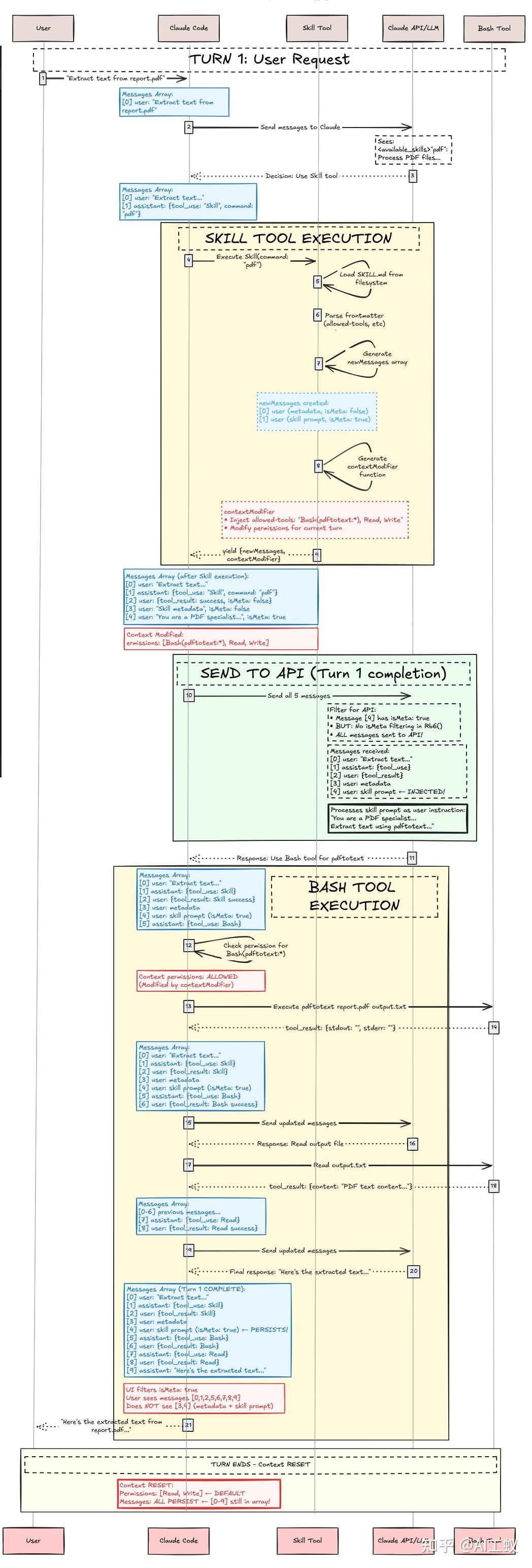
claude-skill-sequence-diagram
Phase 1:Discovery & Loading(启动时)
Claude Code 启动
   ↓
扫描 ~/.claude/skills/ 和 .claude/skills/
   ↓
解析每个 SKILL.md 的 YAML frontmatter
   ↓
构建 <available_skills> 列表
   ↓
嵌入到 Skill 工具的 description 中
Phase 2:User Request & Skill Selection
用户请求:"Extract text from report.pdf"
   ↓
Claude 接收 API 请求(包含 Skill 工具)
   ↓
Claude 读取 <available_skills>
   ↓
纯 LLM 推理:匹配 pdf skill 的 description
   ↓
Claude 返回 tool_use: { "name": "Skill", "input": { "command": "pdf" } }
Phase 3:Skill Tool Execution
验证 → 权限检查 → 加载 SKILL.md
   ↓
生成两条消息:
  - Metadata Message (isMeta: false): "<command-message>The \"pdf\" skill is loading</command-message>"
  - Skill Prompt Message (isMeta: true): "Base Path: /Users/.../pdf/\n\n# PDF Processing Skill..."
   ↓
生成执行上下文修改器(allowedTools, modelOverride)
   ↓
Yield result
Phase 4:Bash Tool Execution(带 Skill 上下文的工具使用)
Claude 接收注入的对话上下文
   ↓
Skill prompt 已转换 Claude 的行为
   ↓
Claude 遵循 pdf skill 的工作流
   ↓
使用 Bash 工具(预先批准,无需用户提示):
  bash: pdftotext report.pdf output.txt
   ↓
读取输出文件,呈现给用户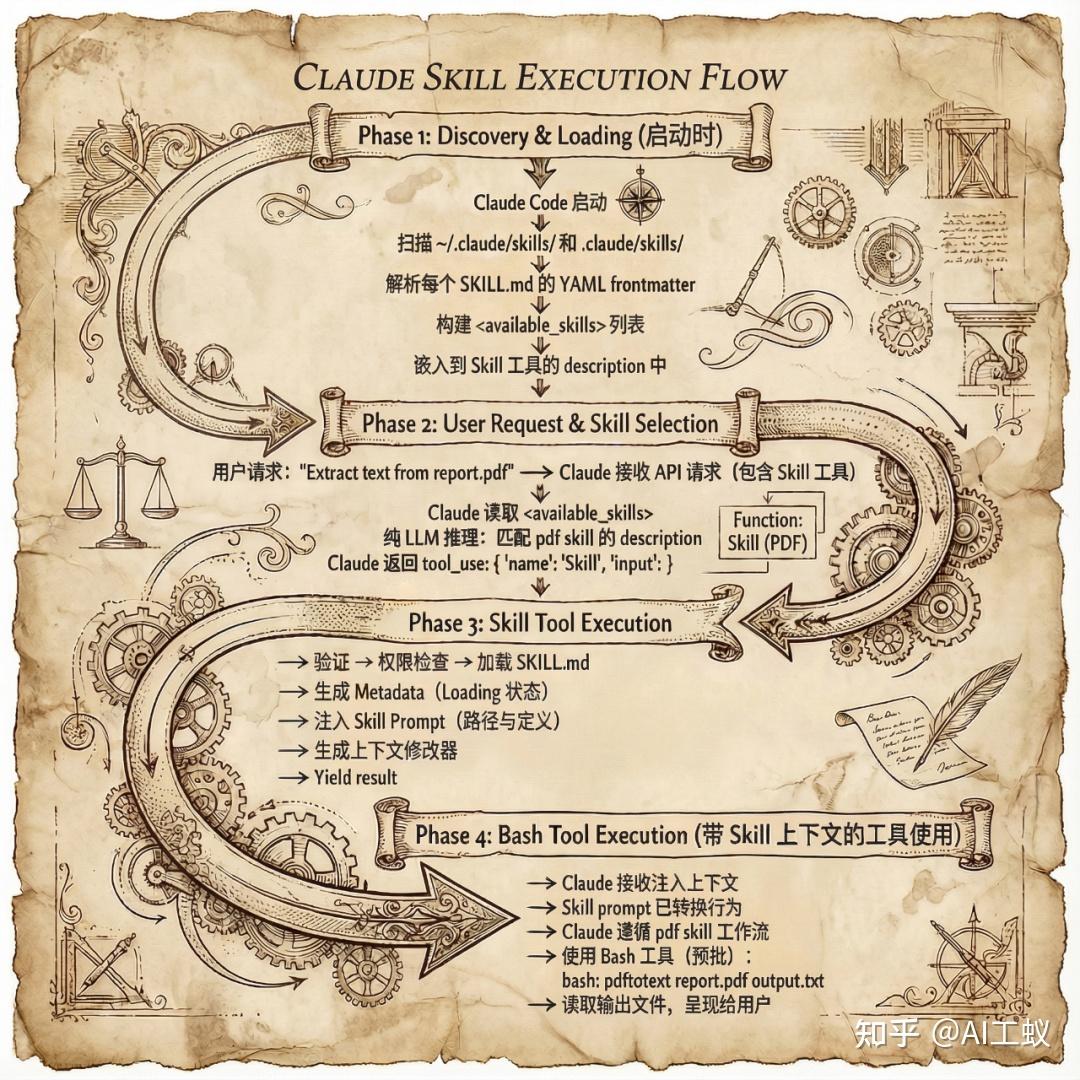
使用 nano banana 生成的 skills 执行流程图(小玩一下,文章封面也是用的大香蕉。生图效果确实很强!)
核心答案:LLM 如何知道 Skills 的文件路径?
综合两篇博客的发现,答案是:
- 1. Claude 不是”猜测”路径 ,而是通过 tool response 被 显式告知 Base Path
- 2. Base Path 在 Skill 被调用时注入 ,作为 Skill Prompt Message 的一部分
- 3. 这是一个优雅的设计 ,将路径解析的责任从 LLM 转移到了 Claude Code 运行时
正如 Mikhail 总结的:
What makes this design clever is that it achieves on-demand prompt expansion without modifying the core system prompt. Skills are executable knowledge packages that Claude loads only when needed, extending capabilities while keeping the main prompt lean.
相关文档
- • Mikhail Shilkov: Inside Claude Code Skills: Structure, prompts, invocation
- • Lee Hanchung: Claude Skills Deep Dive
Claude Code 的执行环境深度对比
这是我的第二个核心疑问:不同环境下 Skills 的执行有何差异?
关于沙箱的官方说明
根据 Claude Code 沙箱文档 的官方描述:
Claude Code features native sandboxing to provide a more secure environment for agent execution while reducing the need for constant permission prompts. Instead of asking permission for each bash command, sandboxing creates defined boundaries upfront where Claude Code can work more freely with reduced risk.
为什么需要沙箱?
官方文档指出传统基于权限的安全模式的问题:
Traditional permission-based security requires constant user approval for bash commands. While this provides control, it can lead to:
- • Approval fatigue : Repeatedly clicking “approve” can cause users to pay less attention to what they’re approving
- • Reduced productivity : Constant interruptions slow down development workflows
- • Limited autonomy : Claude Code cannot work as efficiently when waiting for approvals
沙箱如何工作?
文件系统隔离 :
The sandboxed bash tool restricts file system access to specific directories:
- • Default writes behavior : Read and write access to the current working directory and its subdirectories
- • Default read behavior : Read access to the entire computer, except certain denied directories
- • Blocked access : Cannot modify files outside the current working directory without explicit permission
网络隔离 :
Network access is controlled through a proxy server running outside the sandbox:
- • Domain restrictions : Only approved domains can be accessed
- • User confirmation : New domain requests trigger permission prompts
- • Comprehensive coverage : Restrictions apply to all scripts, programs, and subprocesses spawned by commands
OS 级别强制执行 :
The sandboxed bash tool leverages operating system security primitives:
- • Linux : Uses bubblewrap for isolation
- • macOS : Uses Seatbelt for sandbox enforcement
重要:沙箱默认不启用
沙箱需要通过 /sandbox 命令手动开启:
> /sandbox官方提供两种沙箱模式:
- 1. Auto-allow mode :沙箱内的 Bash 命令自动允许,无需权限提示
- 2. Regular permissions mode :所有 Bash 命令都需要标准权限流程
三种执行环境对比
1. Claude Code CLI(命令行界面)
默认工作方式 :
- • 直接访问本地文件系统
- • 使用用户的系统权限执行命令
- • Skills 从本地路径读取
- • 默认不启用沙箱
沙箱模式(可选) :
- • 通过
/sandbox命令启用 - • Linux 使用 bubblewrap,macOS 使用 Seatbelt
2. Claude Code Desktop(桌面应用)
根据 Desktop 文档:
核心特性 :
- • 与 CLI 类似的本地执行
- • 支持 Git Worktrees 并行会话
- • 工作目录:
~/.claude-worktrees - • 默认不启用沙箱
3. Claude Code on Web(Web 版本)
根据 Web 文档:
工作原理 :
- • 仓库被克隆到 Anthropic 管理的 VM
- • 强制启用隔离 (VM 级别)
- • 默认网络受限
环境对比表
| 特性 | CLI | Desktop | Web |
| 运行位置 | 本地终端 | 本地桌面应用 | Anthropic 云端 VM |
| 文件系统访问 | 本地完全访问 | 本地访问 + Worktree | 克隆的仓库副本 |
| Skills 来源 | ~/.claude/skills/ + .claude/skills/ | 同 CLI | 项目 .claude/skills/ |
| 默认沙箱 | 关闭 | 关闭 | 强制开启 |
| 沙箱实现 | bubblewrap / Seatbelt | 同 CLI | VM 隔离 |
| 网络访问 | 默认无限制 | 同 CLI | 默认受限 |
沙箱的安全限制
官方文档也指出了沙箱的一些限制:
- • Network Sandboxing Limitations : The network filtering system operates by restricting the domains that processes are allowed to connect to. It does not otherwise inspect the traffic passing through the proxy.
- • Privilege Escalation via Unix Sockets : The
allowUnixSocketsconfiguration can inadvertently grant access to powerful system services. - • Filesystem Permission Escalation : Overly broad filesystem write permissions can enable privilege escalation attacks.
相关文档
- • 沙箱机制详解
- • Claude Code on Web 文档
- • Desktop 应用文档
- • Bash Tool 文档
- • Code Execution Tool
Agent Skills 与 MCP 的区别与联系
MCP(Model Context Protocol)和 Agent Skills 都是 Anthropic 生态系统的重要组成部分。
官方的说明
官方工程博客提到了 Skills 与 MCP 的关系:
We’ll also explore how Skills can complement Model Context Protocol (MCP) servers by teaching agents more complex workflows that involve external tools and software.
对比分析
| 维度 | MCP | Agent Skills |
| 抽象层次 | 协议层 | 执行层 |
| 主要目的 | 数据和上下文共享 | 任务执行 |
| 适用范围 | 跨平台、跨应用 | Claude Code 生态 |
| 包含内容 | 接口定义 | SKILL.md + 脚本 + 资源 |
| 执行方式 | 通过协议调用外部服务 | Prompt 注入 + 上下文修改 |
| 运行依赖 | 需要 MCP 服务器持续运行 | 无需外部服务 |
| 可移植性 | 高 | 中 |
互补关系
MCP 和 Agent Skills 不是替代关系,而是互补关系:
- • MCP 提供数据 :通过 MCP 获取外部数据和上下文
- • Skills 执行操作 :使用 Skills 处理数据并执行任务
- • 协同工作 :Skills 可以使用 MCP 获取所需的上下文信息
个人观点:Skills 解决了 MCP 的哪些痛点?
观点一:Token 膨胀问题
MCP 在实际使用中面临一个显著的挑战: Token 膨胀问题 。每个 MCP Server 的工具定义都需要完整地包含在系统提示词中,随着连接的 MCP Server 数量增加,token 消耗呈线性甚至指数级增长——无论这些工具在当前任务中是否会被使用。
Agent Skills 的 渐进式披露 设计正是对这一问题的回应:
- • Level 1 :仅加载 name 和 description(几十个 token)
- • Level 2 :按需加载 SKILL.md(几百到几千 token)
- • Level 3 :按需加载额外资源
这种设计使得 Skills 的 token 消耗与 实际使用 成正比,而非与 安装数量 成正比。
观点二:轻量级 SOP 实现
Agent Skills 的另一个重要价值是提供了一种 轻量级的 SOP(标准操作流程)实现方式 。
传统的工作流自动化通常需要:
- • 学习特定的 workflow 框架(如 LangGraph、Prefect、Airflow)
- • 编写代码定义节点和边
- • 维护复杂的状态机
而 Skills 提供了一种更自然的方式:
- • 用 Markdown 描述流程 :将 SOP 直接写入 SKILL.md
- • 模型自主选择 :Claude 根据任务自动匹配合适的 Skill
- • 零框架依赖 :不需要学习任何 workflow DSL
这本质上是将”工作流编排”的责任从开发者转移到了 LLM,让领域专家可以直接用自然语言定义流程,而无需成为工程师。
观点三:Skills 是 MCP 的”使用说明书”
MCP 解决了”Agent 能做什么”的问题,但没有解决”Agent 应该怎么做”的问题。
一个 MCP Server 可能提供了 20 个工具,但在特定场景下,正确的使用顺序、参数组合、错误处理方式,这些”隐性知识”无法通过工具定义传达。
Skills 正好填补了这个空白:它可以引用 MCP 工具,并提供详细的使用指导,告诉 Claude “在这个场景下,先调用工具 A,检查返回值,如果成功再调用工具 B…”
这也是官方博客提到的:
“We’ll also explore how Skills can complement MCP servers by teaching agents more complex workflows that involve external tools and software.”
观点四:生态定位的差异
- • MCP :开放协议,跨平台、跨应用,任何 LLM 应用都可以使用
- • Skills :Claude Code 专属,深度集成,针对 coding 场景优化
这反映了 Anthropic 的双轨策略:
- • 通过 MCP 建立行业标准,扩大生态影响力
- • 通过 Skills 强化 Claude Code 的竞争壁垒
相关文档
- • Model Context Protocol
- • Anthropic 工程博客:Equipping agents for the real world with Agent Skills
技术要点回顾
通过这次深入探索,结合官方文档和社区逆向工程分析,我对 Claude Code 的 Agent Skills 有了全面的理解:
核心发现
- 1. Skills 的本质 :根据官方定义,Skills 是”organized folders of instructions, scripts, and resources that agents can discover and load dynamically”。通过逆向工程分析,我们进一步了解到 Skills 本质上是 prompt 模板 ,通过注入对话上下文和修改执行上下文来工作。
- 2. 路径解析机制 :通过 Mikhail Shilkov 的逆向工程分析,我们了解到 Claude 通过 tool response 被 显式告知 Base Path ,而不是自己推断。这是一个优雅的设计,将路径解析的责任从 LLM 转移到了运行时。
- 3. 渐进式披露 :官方工程博客详细解释了三级渐进式加载机制,这是 Skills 灵活性和可扩展性的核心设计原则。
- 4. Skill 选择机制 :根据 Lee Hanchung 的分析,没有算法路由或意图分类,完全是 纯 LLM 推理 。
- 5. 执行环境差异 :CLI 和 Desktop 默认不启用沙箱 ,需要通过
/sandbox命令手动开启。Web 版本强制启用 VM 隔离。
实践建议
- 1. 选择合适的环境 :根据任务需求选择 CLI、Desktop 或 Web 版本
- 2. 创建自定义 Skills :将常用的工作流封装为 Skills,提高效率
- 3. 理解渐进式披露 :保持 SKILL.md 简洁,将详细内容放在单独的文件中
- 4. 关注安全性 :理解沙箱的工作原理和限制,只安装来自可信来源的 Skills
思考与展望:Anthropic 的战略布局
从 MCP 到 Agent Skills,再到 Sub-Agents,我们可以看到 Anthropic 围绕 Claude Code 构建的完整生态系统。
Anthropic 的战略意图
- 1. 构建完整的 Agent 生态系统
- • MCP:解决数据和上下文问题
- • Skills:解决能力和执行问题
- • Sub-Agents:解决复杂任务分解问题
- 2. 降低 AI 应用开发门槛
- • 提供标准化的接口和协议
- • 简化工具和能力的集成
- 3. 打造世界级的 Coding 产品
- • 专注于开发者体验
- • 持续的工程化创新
官方的未来展望
官方工程博客提到了 Skills 的未来方向:
In the coming weeks, we’ll continue to add features that support the full lifecycle of creating, editing, discovering, sharing, and using Skills. We’re especially excited about the opportunity for Skills to help organizations and individuals share their context and workflows with Claude.
Looking further ahead, we hope to enable agents to create, edit, and evaluate Skills on their own, letting them codify their own patterns of behavior into reusable capabilities.
大胆预测:Agent Memory 即将到来
从 AgentOS 的角度审视 Anthropic 的产品布局,我们可以看到一个清晰的拼图正在逐步完成:
| 组件 | 解决的问题 | 状态 |
| MCP | Agent 如何获取外部数据 | ✅ 已推出 |
| Skills | Agent 如何执行特定任务 | ✅ 已推出 |
| Sub-Agents | Agent 如何分解复杂任务 | ✅ 已推出 |
| Memory | Agent 如何记住和学习 | ❓ 缺失 |
基于当前的发展轨迹,我预测 Anthropic 下一步将推出 Agent Memory 相关功能。
为什么 Memory 是必然的下一步?
- 1. Claude Code 已经有 Memory 的雏形 :
- •
CLAUDE.md文件可以看作是项目级别的”记忆” - • 但这是静态的、需要手动维护的
- 2. 官方博客的暗示 :“Looking further ahead, we hope to enable agents to create, edit, and evaluate Skills on their own, letting them codify their own patterns of behavior into reusable capabilities.”
这句话暗示了 Agent 自我学习和记忆的方向——Agent 能够”codify their own patterns”,这本质上就是一种记忆能力。 - 3. 完整 Agent 系统的必要组件 :
- • 会话级记忆 :跨 turn 保持上下文
- • 项目级记忆 :记住项目特定的配置、偏好、历史决策
- • 用户级记忆 :跨项目的用户偏好和习惯
- • 自我学习 :从历史交互中学习,自动优化 Skills
Anthropic 的布局:专注于 Coding 场景的 AgentOS
从 MCP、Sub-Agents 到 Skills,Anthropic 的每一步都是围绕 Claude Code 这一世界级 coding 产品做的工程化设计。这不是零散的功能堆砌,而是一个完整的 AgentOS 蓝图:
MCP (数据层) + Skills (能力层) + Sub-Agents (协作层) + Memory (记忆层) = 完整的 Agent 操作系统这种专注和清晰的战略布局,让 Claude Code 不仅仅是一个 AI 编程助手,而是正在演变为一个完整的智能体操作系统。
相关文档
- • Anthropic 工程博客:Equipping agents for the real world with Agent Skills
- • 官方 Skills 仓库
参考资料
官方文档
- • Agent Skills 概述:https://platform.claude.com/docs/en/agents-and-tools/agent-skills/overview
- • Agent Skills 最佳实践:https://docs.claude.com/en/docs/agents-and-tools/agent-skills/best-practices
- • Anthropic 工程博客 - Equipping agents for the real world with Agent Skills:https://www.anthropic.com/engineering/equipping-agents-for-the-real-world-with-agent-skills
- • 官方 Skills 仓库:https://github.com/anthropics/skills
- • Claude Code Skills 文档:https://code.claude.com/docs/en/skills
- • Claude Code on Web 文档:https://code.claude.com/docs/en/claude-code-on-the-web
- • Desktop 应用文档:https://code.claude.com/docs/en/desktop
- • 沙箱机制文档:https://code.claude.com/docs/en/sandboxing
- • Bash Tool 文档:https://platform.claude.com/docs/en/agents-and-tools/tool-use/bash-tool
- • Code Execution Tool:https://platform.claude.com/docs/en/agents-and-tools/tool-use/code-execution-toocontainers